Showing posts with label xp_instance_regwrite. Show all posts

2013-09-10

xp_instance_regwrite syntax

The stored procedure "master.sys.xp_instance_regwrite" is not documented in SQL Server Books Online (BOL), but is usefull. In general the syntax is
EXECUTE [master].[sys].[xp_instance_regwrite]
  @rootkey = N'<name of root key>'
 ,@key = N'<key name>'
 ,@value_name = N'<key name value>'
 ,@type = N'<key type>'
 ,@value = N'<key value>';


For example the number of SQL Server Errorlog files can be updated by the statement
EXECUTE [master].[sys].[xp_instance_regwrite]
  @rootkey = N'HKEY_LOCAL_MACHINE'
 ,@key = N'Software\Microsoft\MSSQLServer\MSSQLServer'
 ,@value_name = N'NumErrorLogs'
 ,@type = N'REG_DWORD'
 ,@value = 42;


Use with caution!

The parameter @type takes a value without N'' around (@type = <key type>), but I like the Unicode framing. This way I try to avoid difficulties when building the values outside the call.

The type of the value for the parameter @value depends on the registry value type.
If the registry value type is a integer like REG_DWORD, the parameter value must be a integer.
 ,@value = 42;
If the registry value type is a string like REG_SZ, the parameter value must be a string.
 ,@value = N'John';

PowerShell usage

If the usage of this (undocumented) procedure should be included in a PowerShell script, it could be with ADO.NET in a function like this
function Write-MsSqlDbInstanceRegistry
{
  [CmdletBinding()]
  Param (
    # help description
    [Parameter(Mandatory=$true, Position=0)]
    [System.Data.SqlClient.SqlConnection]$MsSqlDbCnn,

    # Registry key path
    [Parameter(Mandatory=$true, Position=1)]
    [String]$RegKey,

    # Registry key name
    [Parameter(Mandatory=$true, Position=2)]
    [String]$RegName,

    # Registry key type
    [Parameter(Mandatory=$true, Position=3)]
    [String]$RegType,

    # Registry key value
    [Parameter(Mandatory=$true, Position=4)]
    [String]$RegValue
  )

  Begin {
    "{0:s}Z Write-MsSqlDbInstanceRegistry( '$RegKey', '$RegName', '$RegType', '$RegValue')" -f $([System.DateTime]::UtcNow) | Write-Verbose
  }

  Process {
    $MsSqlDbCmd = New-Object System.Data.SqlClient.SqlCommand
    $MsSqlDbCmd.Connection = $MsSqlDbCnn
    $MsSqlDbCmd.CommandText = '[master].[sys].[xp_instance_regwrite]'
    $MsSqlDbCmd.CommandType = [System.Data.CommandType]::StoredProcedure

    $MsSqlDbCmd.Parameters.Add("@rootkey", [System.Data.SqlDbType]::NVarChar, 128) | Out-Null
    $MsSqlDbCmd.Parameters['@rootkey'].Direction = [System.Data.ParameterDirection]::Input
    $MsSqlDbCmd.Parameters['@rootkey'].Value = 'HKEY_LOCAL_MACHINE'

    $MsSqlDbCmd.Parameters.Add("@key", [System.Data.SqlDbType]::NVarChar, 128) | Out-Null
    $MsSqlDbCmd.Parameters['@key'].Direction = [System.Data.ParameterDirection]::Input
    $MsSqlDbCmd.Parameters['@key'].Value = $RegKey

    $MsSqlDbCmd.Parameters.Add("@value_name", [System.Data.SqlDbType]::NVarChar, 128) | Out-Null
    $MsSqlDbCmd.Parameters['@value_name'].Direction = [System.Data.ParameterDirection]::Input
    $MsSqlDbCmd.Parameters['@value_name'].Value = $RegName

    $MsSqlDbCmd.Parameters.Add("@type", [System.Data.SqlDbType]::NVarChar, 128) | Out-Null
    $MsSqlDbCmd.Parameters['@type'].Direction = [System.Data.ParameterDirection]::Input
    $MsSqlDbCmd.Parameters['@type'].Value = $RegType

    switch -CaseSensitive ($RegType) {
      'REG_DWORD' {
        $MsSqlDbCmd.Parameters.Add("@value", [System.Data.SqlDbType]::Int) | Out-Null
        $MsSqlDbCmd.Parameters['@value'].Value = [Int]$RegValue
      }
      'REG_SZ' {
        $MsSqlDbCmd.Parameters.Add("@value", [System.Data.SqlDbType]::NVarChar, 128) | Out-Null
        $MsSqlDbCmd.Parameters['@value'].Value = $RegValue
      }
      default {
        "{0:s}Z Unknown Registry Value Type '$RegKeyType'." -f $([System.DateTime]::UtcNow) | Write-Error
        return
      }
    }
    $MsSqlDbCmd.Parameters['@value'].Direction = [System.Data.ParameterDirection]::Input

    $MsSqlDbCnn.Open()
    [Int]$RowCount = $MsSqlDbCmd.ExecuteNonQuery()
    $MsSqlDbCnn.Close()
  }

  End {}
}

The PowerShell function can be used like this
$Cnn = New-Object System.Data.SqlClient.SqlConnection
$Cnn.ConnectionString = 'Data Source=(local);Integrated Security=SSPI;Application Name=MsSqlDbInstanceRegistry'

Write-MsSqlDbInstanceRegistry `
  -MsSqlDbCnn $Cnn `
  -RegKey 'Software\Microsoft\MSSQLServer\MSSQLServer' `
  -RegName 'NumErrorLogs' `
  -RegType 'REG_DWORD' `
  -RegValue '42' `
  -Verbose


History

2010-09-15  First entry.
2013-09-09  PowerShell added.
2013-11-19  Registry Value Types handled correct.

2010-06-08

Cycle SQL Server Errorlog

The standard SQL Server Errorlog has six generations and is recycled implicit by a service restart.
This might be an issue when the database instance Login auditing is „Both failed and successful logins“ (Full), because the Errorlog will contain 100000+ entries.
I have several times seen more than a million entries.
A Errorlog of this size it takes some time to open in SQL Server Management Studio.
You could „cheat“ by opening it in a editor on a UNC path. This could require an editor that can handle a file larger than 1 GB.

With only six generations of the Errorlog, you will experience to loose the last usefull Errlog when the instance is restarted a handfull times. This will happen when a patch is failing, power blackout or another unpleasent event.
Configure SQL Server Error Logs.
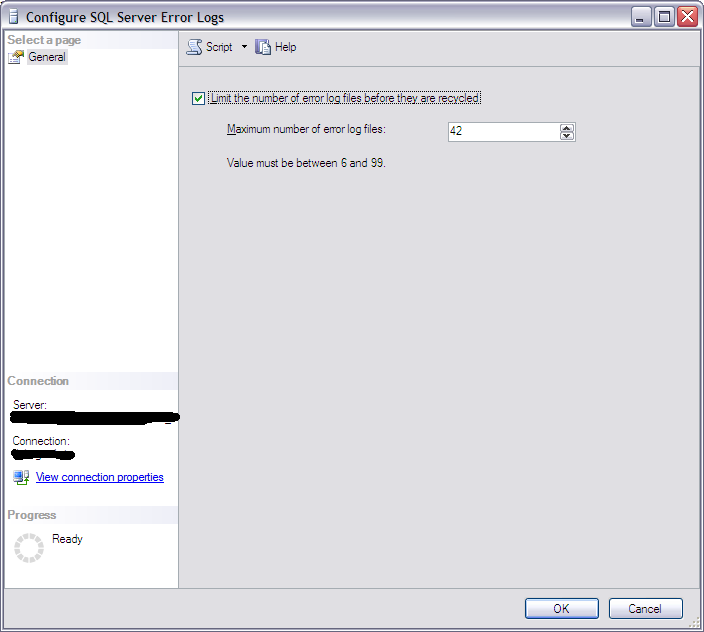
To make the Errorlog available I have increased the number of generations.
This can be done using SQL Server Management Studio by expanding the database instance in the Object Explorer and expanding the „Management“ section. Right-click on „SQL Server Logs“ and click „Configure“.
Then enter the number of Errorlog generations (see figure „Configure SQL Server Error Logs“).

The number of Errorlog generations can not be altered by sp_configure or an ALTER statement, but in the Registry.

To make the Errorlog available I have also sheduled a recycle every day at 23:59:30. Recycling at this time gives the Errorlog a timestamp matching the day it contains log entries from.

The two tasks above can be done using this T-SQL script:
EXECUTE [master].[sys].[xp_instance_regwrite]
@rootkey = N'HKEY_LOCAL_MACHINE',
@key = N'Software\Microsoft\MSSQLServer\MSSQLServer',
@value_name = N'NumErrorLogs',
@type = N'REG_DWORD',
@value = N'42';
GO

DECLARE @sa_name sysname = ( -- Name of 'sa' account in hardended installation
SELECT [server_principals].[name]
FROM [master].[sys].[server_principals]
WHERE [server_principals].[principal_id] = 1
);
DECLARE @jobId BINARY(16);
EXECUTE [msdb].[dbo].[sp_add_job]
@job_name = N'MsSqlDbErrorlogCycle',
@enabled = 1,
@notify_level_eventlog = 2,
@notify_level_email = 2,
@notify_level_netsend = 2,
@notify_level_page = 2,
@delete_level = 0,
@description = N'Cycle SQL Server Database Engine Errorlog.
Created by Niels Grove-Rasmussen.',
@category_name = N'Database Maintenance',
@owner_login_name = @sa_name,
@job_id = @jobId OUTPUT;
EXECUTE [msdb].[dbo].[sp_add_jobserver]
@job_name = N'MsSqlDbErrorlogCycle';
EXECUTE [msdb].[dbo].[sp_add_jobstep]
@job_name = N'MsSqlDbErrorlogCycle',
@step_name = N'Execute MsSqlDbErrorlogCycle',
@step_id = 1,
@cmdexec_success_code = 0,
@on_success_action = 1,
@on_fail_action = 2,
@retry_attempts = 0,
@retry_interval = 0,
@os_run_priority = 0,
@subsystem = N'TSQL',
@command = N'EXECUTE [master].[dbo].[sp_cycle_errorlog];',
@database_name = N'master',
@flags = 4;
EXECUTE [msdb].[dbo].[sp_update_job]
@job_name = N'MsSqlDbErrorlogCycle',
@notify_level_eventlog = 2,
@notify_level_email = 2,
@notify_level_netsend = 2,
@notify_level_page = 2,
@delete_level = 0,
@description = N'Cycle SQL Server Database Engine Errorlog',
@category_name = N'Database Maintenance',
@owner_login_name = @sa_name;
DECLARE @schedule_id INT;
EXECUTE [msdb].[dbo].[sp_add_jobschedule]
@job_name = N'MsSqlDbErrorlogCycle',
@name = N'Schedule MsSqlDbErrorlogCycle',
@freq_type = 4,
@freq_interval = 1,
@freq_subday_type = 1,
@freq_subday_interval = 0,
@freq_relative_interval = 0,
@freq_recurrence_factor = 1,
@active_start_time = 235930,
@schedule_id = @schedule_id OUTPUT;


History

2010-06-08  First blog entry.
2013-11-19  Name of sa–principal in local variable.