I did not downloaded a driver for my ATI 4850 card when I installed Windows 7 (x64) as the installation found the card and installed a suitable driver. But inspired by a colleague I took a look at the installed driver version, which were 8.6 while the the ATI driver site gives version 10.6 on the latest driver suite.
I downloaded the full Catalyst Software Suite, but made a custom installation where I unselected "The Lord of the Rings free trial", "HDMI/DP Audio driver" and "Communication Opt-In".
After installation the driver version is 8.7. Not a major leap in driver version, but the date of the driver is now 2010-05-27 instead of 2009-08-17.
At the end of the day I have learned that I can not trust Microsoft to update my drivers, even the hardware have been identified correct by the installation.
By the way - I can not feel any difference...
2010-07-26

2010-06-30
NTFS Cluster Size
When formatting a partition for SQL Server data, it is recommended by storage vendors, MVPs and other that the allocation unit size should be the largest size possible. For NTFS this means 64 KB. Often the DBA is called in after the server is build, installed and configured, but I still want to confirm the allocation unit size. This can be done bu the command-line tool FSUTIL (%SystemRoot%\system32\fsutil.exe), and wrapping a generic command-line statement in PowerShell gives me the value itself to be viewed or used by the automation.
When using FSUTIL, the allocation unit size is typically called NTFS Cluster Size, and is named "Bytes Per Cluster". On newer Windows installations you need to execute FSUTIL with administrative privileges.
The function can be called with one drive letter as parameter value.
Or with several drive letters as parameter value.
The output values can be referred as object attribute values and on implicit drive reference.
I find it a rather cumbersome way to get a simple value, but by using WMI it can be done much simpler.
Reference
SQLCAT: "Disk Partition Alignment Best Practices for SQL Server"
Brent Ozar: "Ten Things DBAs Need to Know About Storage"
Chad Miller: "Disk Alignment Partitioning: The Good, the Bad, the OK and the Not So Ugly"
VistaForums: "Getting the 'cluster size' of your hard disk?"
MSDN Library: "Win32_Volume Class"
Backlog
Get the NTFS Cluster Size of a Mount Point.
When using FSUTIL, the allocation unit size is typically called NTFS Cluster Size, and is named "Bytes Per Cluster". On newer Windows installations you need to execute FSUTIL with administrative privileges.
function Get-NtfsClusterSize {
param ( [char[]]$driveLetter = 'c' )

 $driveLetter | ForEach-Object {
  if ( Test-Path "$($_):" ) {
   $cs = New-Object PSObject
   $cs | Add-Member -MemberType NoteProperty Drive $_
   # Get 7th line of output from FSUTIL
   $cs | Add-Member -MemberType NoteProperty Size (fsutil fsinfo ntfsinfo "$($_):")[7].split()[-1]
   $cs
  }
 }
}
The function can be called with one drive letter as parameter value.
Get-NtfsClusterSize c
Or with several drive letters as parameter value.
Get-NtfsClusterSize c,h
The output values can be referred as object attribute values and on implicit drive reference.
$clusterSize = Get-NtfsClusterSize

$clusterSize.Drive

$clusterSize.Size
I find it a rather cumbersome way to get a simple value, but by using WMI it can be done much simpler.
$wql = "SELECT BlockSize,DriveLetter,Label FROM Win32_Volume WHERE FileSystem='NTFS'"

Get-WmiObject -Query $wql -ComputerName '.' | Select-Object DriveLetter,Label,BlockSize | Format-Table -AutoSize
Reference
SQLCAT: "Disk Partition Alignment Best Practices for SQL Server"
Brent Ozar: "Ten Things DBAs Need to Know About Storage"
Chad Miller: "Disk Alignment Partitioning: The Good, the Bad, the OK and the Not So Ugly"
VistaForums: "Getting the 'cluster size' of your hard disk?"
MSDN Library: "Win32_Volume Class"
Backlog
Get the NTFS Cluster Size of a Mount Point.
New Mail shortcut
This is a handy one-click shortcut for a new Outlook mail.
"C:\Programmer\Microsoft Office\Office14\OUTLOOK.EXE" /c ipm.note

I have altered the shortcut ikon to distinct it from a Outlook shortcut. The example to the right is from a Danish Windows XP.
The shortcut is placed in the Quick Start toolbar with a helpfull comment.
"C:\Programmer\Microsoft Office\Office14\OUTLOOK.EXE" /c ipm.note

I have altered the shortcut ikon to distinct it from a Outlook shortcut. The example to the right is from a Danish Windows XP.
The shortcut is placed in the Quick Start toolbar with a helpfull comment.
2010-06-08
Cycle SQL Server Errorlog
The standard SQL Server Errorlog has six generations and is recycled implicit by a service restart.
This might be an issue when the database instance Login auditing is „Both failed and successful logins“ (Full), because the Errorlog will contain 100000+ entries.
I have several times seen more than a million entries.
A Errorlog of this size it takes some time to open in SQL Server Management Studio.
You could „cheat“ by opening it in a editor on a UNC path. This could require an editor that can handle a file larger than 1 GB.
With only six generations of the Errorlog, you will experience to loose the last usefull Errlog when the instance is restarted a handfull times. This will happen when a patch is failing, power blackout or another unpleasent event.
To make the Errorlog available I have increased the number of generations.
This can be done using SQL Server Management Studio by expanding the database instance in the Object Explorer and expanding the „Management“ section. Right-click on „SQL Server Logs“ and click „Configure“.
Then enter the number of Errorlog generations (see figure „Configure SQL Server Error Logs“).
The number of Errorlog generations can not be altered by sp_configure or an ALTER statement, but in the Registry.
To make the Errorlog available I have also sheduled a recycle every day at 23:59:30. Recycling at this time gives the Errorlog a timestamp matching the day it contains log entries from.
The two tasks above can be done using this T-SQL script:
2013-11-19 Name of sa–principal in local variable.
This might be an issue when the database instance Login auditing is „Both failed and successful logins“ (Full), because the Errorlog will contain 100000+ entries.
I have several times seen more than a million entries.
A Errorlog of this size it takes some time to open in SQL Server Management Studio.
You could „cheat“ by opening it in a editor on a UNC path. This could require an editor that can handle a file larger than 1 GB.
With only six generations of the Errorlog, you will experience to loose the last usefull Errlog when the instance is restarted a handfull times. This will happen when a patch is failing, power blackout or another unpleasent event.
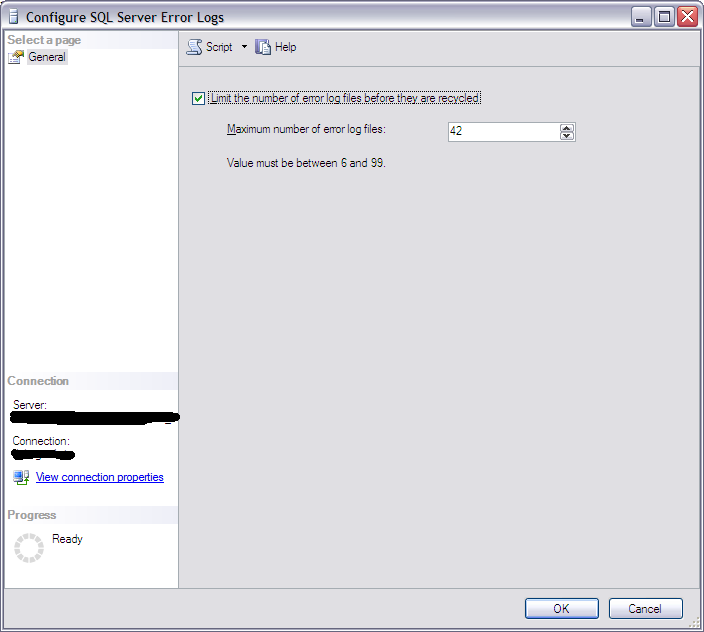 |
| Configure SQL Server Error Logs. |
This can be done using SQL Server Management Studio by expanding the database instance in the Object Explorer and expanding the „Management“ section. Right-click on „SQL Server Logs“ and click „Configure“.
Then enter the number of Errorlog generations (see figure „Configure SQL Server Error Logs“).
The number of Errorlog generations can not be altered by sp_configure or an ALTER statement, but in the Registry.
To make the Errorlog available I have also sheduled a recycle every day at 23:59:30. Recycling at this time gives the Errorlog a timestamp matching the day it contains log entries from.
The two tasks above can be done using this T-SQL script:
EXECUTE [master].[sys].[xp_instance_regwrite]

@rootkey = N'HKEY_LOCAL_MACHINE',

@key = N'Software\Microsoft\MSSQLServer\MSSQLServer',

@value_name = N'NumErrorLogs',

@type = N'REG_DWORD',

@value =  N'42';

GO


DECLARE @sa_name sysname = (  -- Name of 'sa' account in hardended installation

SELECT [server_principals].[name]

FROM [master].[sys].[server_principals]

WHERE [server_principals].[principal_id] = 1

);

DECLARE @jobId BINARY(16);

EXECUTE [msdb].[dbo].[sp_add_job]

@job_name = N'MsSqlDbErrorlogCycle',

@enabled = 1,

@notify_level_eventlog = 2,

@notify_level_email = 2,

@notify_level_netsend = 2,

@notify_level_page = 2,

@delete_level = 0,

@description = N'Cycle SQL Server Database Engine Errorlog.

Created by Niels Grove-Rasmussen.',

@category_name = N'Database Maintenance',

@owner_login_name = @sa_name,

@job_id = @jobId OUTPUT;

EXECUTE [msdb].[dbo].[sp_add_jobserver]

@job_name = N'MsSqlDbErrorlogCycle';

EXECUTE [msdb].[dbo].[sp_add_jobstep]

@job_name = N'MsSqlDbErrorlogCycle',

@step_name = N'Execute MsSqlDbErrorlogCycle',

@step_id = 1,

@cmdexec_success_code = 0,

@on_success_action = 1,

@on_fail_action = 2,

@retry_attempts = 0,

@retry_interval = 0,

@os_run_priority = 0,

@subsystem = N'TSQL',

@command = N'EXECUTE [master].[dbo].[sp_cycle_errorlog];',

@database_name = N'master',

@flags = 4;

EXECUTE [msdb].[dbo].[sp_update_job]

@job_name = N'MsSqlDbErrorlogCycle',

@notify_level_eventlog = 2,

@notify_level_email = 2,

@notify_level_netsend = 2,

@notify_level_page = 2,

@delete_level = 0,

@description = N'Cycle SQL Server Database Engine Errorlog',

@category_name = N'Database Maintenance',

@owner_login_name = @sa_name;

DECLARE @schedule_id INT;

EXECUTE [msdb].[dbo].[sp_add_jobschedule]

@job_name = N'MsSqlDbErrorlogCycle',

@name = N'Schedule MsSqlDbErrorlogCycle',

@freq_type = 4,

@freq_interval = 1,

@freq_subday_type = 1,

@freq_subday_interval = 0,

@freq_relative_interval = 0,

@freq_recurrence_factor = 1,

@active_start_time = 235930,

@schedule_id = @schedule_id OUTPUT;
History
2010-06-08 First blog entry.2013-11-19 Name of sa–principal in local variable.
2010-05-08
Installing SQL Server 2008 R2
On my private workstation (Windows 7 Ultimate x64) I first tried to in-place install the new SQL Server 2008 R2 (SQL2008R2), but it look like the installation collided with old installations of Visual Studio 2008. The last weeks I have upgraded Visual Studio and Office to 2010, but I have not before had problems by having them installed before installing SQL Server.
OK - I uninstalled all previous installed SQL Server and Visual Studio parts I could find in the Control Panel. Still no success.
This was beginning to be annoying, so I deleted all SQL Server and Visual Studio fils and folders. Hrmf - still the same error while installing SQL2008R2.
This morning I found the solution in the blog post "Rule "Previous releases of Microsoft Visual Studio 2008" failed" by Mark Smith at LessThanDot.
The trick is to start the installation with the Windows Shell statement
The installation finished with success and I can continue on working with the latest version of SQL Server.
OK - I uninstalled all previous installed SQL Server and Visual Studio parts I could find in the Control Panel. Still no success.
This was beginning to be annoying, so I deleted all SQL Server and Visual Studio fils and folders. Hrmf - still the same error while installing SQL2008R2.
This morning I found the solution in the blog post "Rule "Previous releases of Microsoft Visual Studio 2008" failed" by Mark Smith at LessThanDot.
The trick is to start the installation with the Windows Shell statement
setup.exe /ACTION=install /SkipRules=VSShellInstalledRule
The installation finished with success and I can continue on working with the latest version of SQL Server.
Subscribe to:
Posts (Atom)

 Posts
Posts

